
Every September I see students start Year 12 with the calculator they used at GCSE. Most of them find out within a couple of weeks that it won't do what the course needs. Some go months longer, working things out the long way round, before anyone tells them that a lot of what they're finding slow is meant to take one button.
This is what I think you need, what I'd buy, and the one question worth asking before you spend anything.
The short answer
Check with your school before you buy anything
Best overall
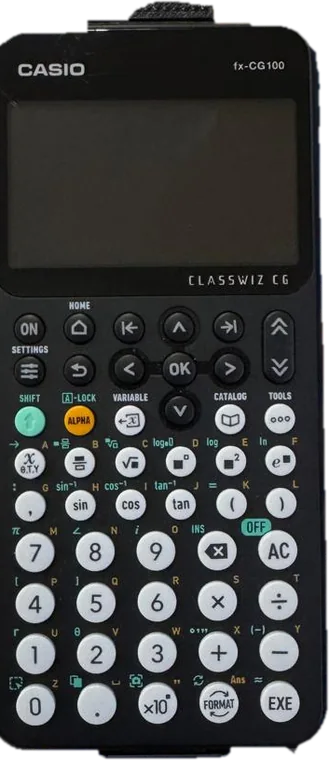
Casio fx-CG100
The current Casio graphical calculator, and worth it if you will learn to use it.
Around £100
Science StudioBest value
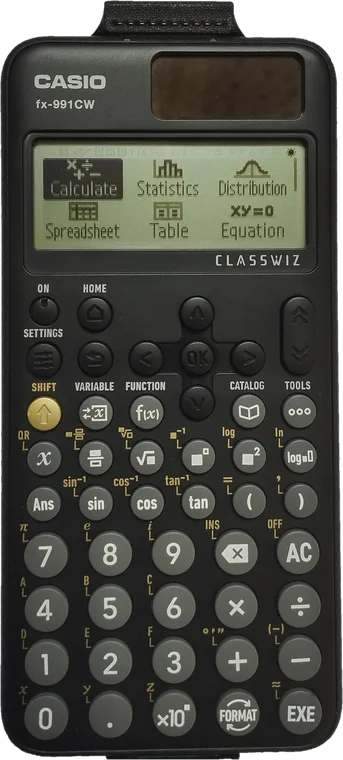
Casio fx-991CW+
Everything A Level asks of a scientific calculator, for a quarter of the price.
£25 to £30
Science StudioBest second hand
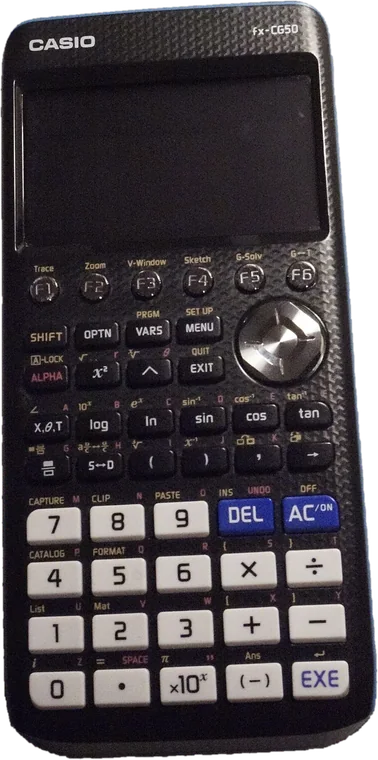
Casio fx-CG50
Discontinued but still exam approved, and the model most UK tutorials were written for.
Around £100
Science StudioBefore you buy anything, ask your school
Most schools and colleges recommend a particular calculator, and there's a good reason for it. Teaching a class is much easier when everyone has the same model. The teacher can put the key presses on the board, students can help each other, and nobody spends half the lesson looking for a menu that's somewhere else on their calculator.
If you turn up with a model nobody in the department has used, you'll be working it out on your own the first time you can't find a function. That's time you could have spent on the maths.
Ask first. Email your maths department, or ask in your first lesson, whether they recommend a particular calculator. If they do, I'd go with that over anything below. The rest of this guide is for students whose school leaves it up to them.
What the exam boards require
Edexcel, AQA and OCR all set the same practical minimum for A Level Maths. Your calculator has to be able to:
- Handle an iterative procedure, so you can repeat a calculation using the previous answer.
- Compute summary statistics from a data set, such as the mean and standard deviation.
- Give you probabilities from the binomial and normal distributions, including the cumulative versions.
There's also a limit at the top end. Calculators that do symbolic algebra or symbolic calculus, usually called CAS models, aren't allowed in any A Level Maths exam. If it shows you the algebraic steps of a solution, it can't be used. Graphical calculators without that feature are allowed in every A Level Maths and Further Maths paper.
Why a GCSE calculator isn't enough
It's tempting to read that list, see the word statistics, and assume your old calculator will do until the statistics comes up. It won't, and most students find that out a lot sooner.
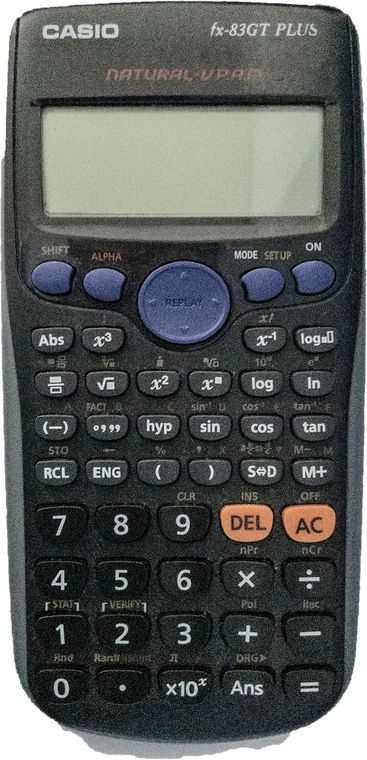
The usual GCSE calculators, the Casio fx-83 and fx-85 families, are built for a different course. They're fine for basic calculations, but they can't do most of the things that save time at A Level:
- Solve an equation. There's no quadratic or cubic solver, so checking the roots of a quadratic has to be done by hand every time. That starts in the first few weeks of Year 12.
- Solve simultaneous equations, which come up everywhere from coordinate geometry to mechanics.
- Evaluate a definite integral or a gradient numerically, which is the quickest way to check your calculus.
- Give you the binomial and normal distributions, the requirement above. This is where the calculator goes from being slow to not being usable at all.
That isn't a criticism of those calculators. They do what they were designed for, but A Level asks for more, and early on.
It's also worth sorting this out now rather than at Christmas. The sooner you have the calculator, the longer you have to get used to it. That matters most if you go graphical, because it'll feel quite different to the one you used at GCSE, and it usually takes a few weeks before you stop searching through menus.
Where that leaves you. Your GCSE calculator isn't enough, and the most powerful calculators on the market aren't allowed. What you want is somewhere in between, which leaves two decisions, whether to go graphical or scientific, and which model to buy.
Our pick: the Casio fx-CG100
If you can afford it, and you're willing to learn how to use it, the Casio fx-CG100 is the calculator I'd suggest for most A Level students. It's Casio's current top of the range graphical calculator for UK schools, it's approved for A Level and Further Maths, and it replaces the model most sixth forms have used for years.
That model was the fx-CG50, which has now been discontinued. Casio stopped making it and expected the last stock to sell out during autumn 2025, with the classroom emulator being retired during the 2026 to 2027 academic year. Existing CG50s are still allowed in exams and are still good calculators, but if you're buying new, it's a model on the way out.
Casio fx-CG100
Does everything the CG50 did, with a simpler interface and a screen that is easy to read. The one to buy if you will put the time in.
- Menu driven, with far fewer abbreviations to work out
- High resolution colour backlit screen
- One press FORMAT key for exact and decimal answers
- Inequality solver and an improved Graph and Table
- Approved for GCSE, A Level and Further Maths
The obvious downside is the price. Graphical calculators are around £100, compared with under £30 for a scientific one, so it's worth being honest with yourself about whether you'll use it enough to justify that.
Is a graphical calculator worth it for you?
A graphical calculator is only worth buying if you are willing to learn how to use it.
If you sit the exam with a £100 calculator you only know how to use as a scientific one, you've paid a lot for nothing extra, and you may lose time looking through menus under pressure. If you don't think you'll put the time in during Year 12, I'd buy a good scientific calculator instead.
For most of the course it makes very little difference which calculator you have. Differentiation, integration by parts, trigonometric identities, proof, vectors and most of mechanics are the same whichever one you're using.
Where a graphical calculator does help:
- Critical regions in hypothesis testing. A graphical calculator has an inverse binomial function, so you can go straight from a probability to the boundary value. A scientific calculator only gives you cumulative probabilities, so you have to try values one at a time until you find the boundary. This is the clearest case where the better calculator saves time in an exam.
- Seeing the graph. This helps right through the functions work. Roots, intersections, turning points, asymptotes and transformations are much easier to think about when you can see the curve rather than imagine it. It's also a quick check, because if your algebra gives three roots and the screen shows one, you know to go back and look again.
- Equation solving. Polynomials, simultaneous equations and numerical solutions, more quickly and for more cases.
A simple test. Will you spend an hour or two, several times over the year, learning what the calculator can do and practising until it's automatic? If so, it's probably worth it. If not, a scientific calculator is fine, and you won't be at much of a disadvantage for most of the course.
If you're going scientific: the fx-991CW+
This is where most students end up, and it's a perfectly good choice. If you've decided against a graphical calculator, you still need one that meets the requirements above. The standard choice for A Level Maths is the Casio fx-991CW, and there's now a revised version, the fx-991CW+, which is the one I'd look for.
The original CW came with a redesigned menu system that not everyone liked. The most common complaint was that switching between fractions and decimals, which you do all the time, took more presses than before. The CW+ sorts out several of those points.
Casio fx-991CW+
Everything A Level asks of a scientific calculator, and it sorts out the things people disliked about the original CW. For most students this is the sensible one to buy.
- One press FORMAT toggle between exact and decimal answers
- Binomial and normal distributions, equation solving, integration and differentiation
- Adds highest common factor, lowest common multiple and recurring decimals
- Catalog and number key shortcuts, so less scrolling
Either version will do the job, and both are approved for GCSE and A Level. If the CW+ is available where you're buying, I'd get that one.
The other graphical option
If the CG100 is over your budget, or you find a good price on the model it replaced, the fx-CG50 does the same job.
Casio fx-CG50
The model most UK teaching resources and tutorial videos were written for. Discontinued, but exam approved and still a good calculator, so a hand me down or a sensibly priced new one is worth having.
- Everything you need for A Level and Further Maths
- The largest library of UK classroom material of any graphical calculator
- Discontinued, so stock is running out and the emulator is being retired
NumWorks: the wildcard
Almost everyone in a UK sixth form uses a Casio. NumWorks is the exception worth knowing about, and it's a good calculator in its own right. Judged on its own, I think it does most things better than the Casios, and more intuitively. The menus are in plain words, the screen is colour, Python is built in, and most people can find their way round it without the manual. It feels like a more modern design.
It's also allowed in your exams. NumWorks meets the JCQ requirements, and the calculator has a UK exam mode. Switching it on clears the memory, removes any programs or applications you've added, disables the Elements app, and shows a marker on the screen for the whole paper. Turning it on before an exam is the sensible thing to do, and it's what makes the calculator straightforwardly compliant.
The drawback is that very few people around you will know how to use it.
The risk is familiarity, not the rules. Hardly any UK schools teach with NumWorks. Your teacher probably won't be able to help you find a function on it, there are far fewer UK tutorials for your specification, and exam staff who haven't seen one before may be cautious about it.
None of that makes it non compliant. It does mean learning it is mostly down to you, and you should be able to show the exam mode marker if anyone asks. If you like the idea, I'd agree it with your school well before the exams rather than on the morning.
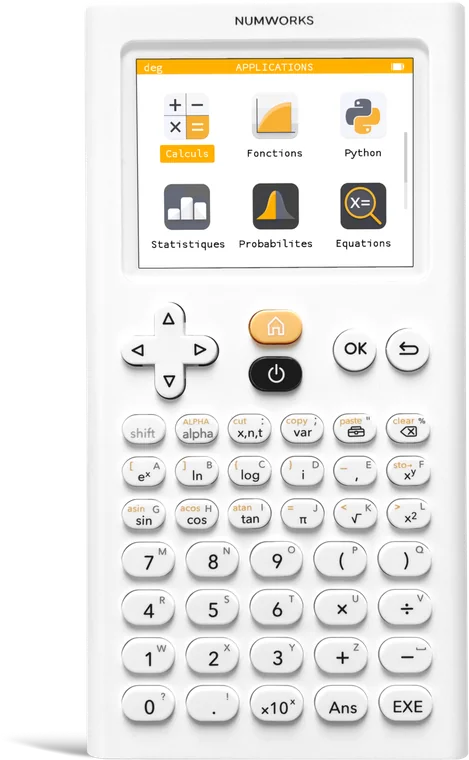
NumWorks
The best designed calculator here, and exam compliant with UK exam mode switched on. The main thing to bear in mind is that you may be the only person in the room with one.
- Clean, modern interface that needs very little explaining
- Colour screen and Python built in
- UK exam mode clears memory and shows a marker for the whole paper
- Almost no UK classroom support, so you are learning it alone
What about the fx-991EX?
For years the fx-991EX was the scientific calculator most students had, and plenty of teachers and students still prefer it. If you already have one, from GCSE or handed down from an older brother or sister, keep using it. It's sturdy, quick, well laid out, and it does everything A Level Maths requires.
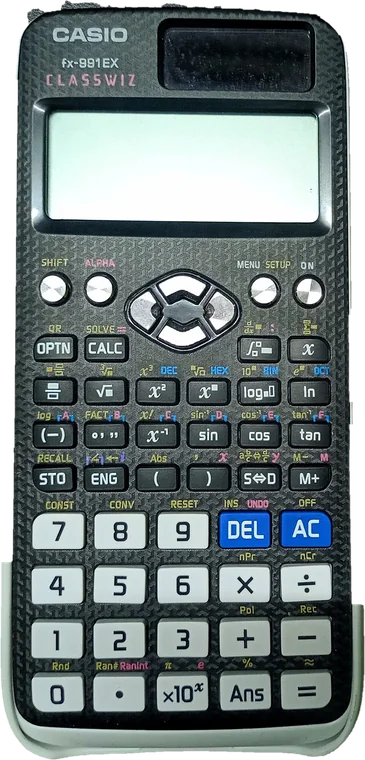
Buying one now is different. It's been replaced, so genuine new stock is hard to find, and a lot of what's sold cheaply on online marketplaces is counterfeit. That matters more than it might sound, because counterfeit units have been reported to give incorrect results on calculations, which isn't something you want in an exam.
Checking a unit. Casio publishes an authenticity check. On a genuine ClassWiz you can bring up a QR code from the settings menu and scan it with a phone, and it should take you to Casio's own site. If a unit doesn't produce a QR code, or the code won't scan, I'd treat it as suspect.
You'll notice there's no buy link in this section. I'd rather not point you at a marketplace listing for a discontinued model given how common counterfeits are. A new fx-991CW+ costs about the same, and you know it's genuine.
If you're taking Further Maths
Everything above assumes A Level Maths on its own. If you're also taking Further Maths, the case for a graphical calculator is stronger.
A lot of Further Maths is easier to follow when you can see it. Polar curves and parametric equations are the clearest example. A graphical calculator plots both, and a scientific calculator can't plot anything. Complex numbers, matrices and vectors are also easier on the graphical models, and being able to check an inverse, a determinant or a cross product quickly is useful when the algebra gets long.
It isn't essential, and plenty of students do Further Maths with a good scientific calculator. But if you're undecided about spending the extra, Further Maths is probably what tips it.
The rules on exam day
Whatever you buy, the regulations make it your responsibility rather than the school's. Before every paper you're expected to:
- Make sure the calculator works and the batteries are good. I'd change them before the exam season starts rather than on the morning.
- Clear the memory, including anything stored in variables or programs.
- Remove any case, lid or cover with printed instructions or formulae on it. A lot of calculators have exactly that on the back of the lid.
Calculators must also be quiet, hand held and self powered, and must not hold retrievable information such as databanks or notes. Scientific constants are fine.
Every model compared
| Calculator | Who it suits | Rough cost |
|---|---|---|
| The standard scientific choice, and the right one for most students | £25 to £30 |
| Worth the money if you will learn to use it properly | Around £100 |
| A good buy if handed down or found new, but discontinued | Around £100 |
| Exam compliant and well designed, but few people around you will know it | Around £90 |
| Good if you already have one, risky to buy secondhand | Varies |
| Your GCSE calculator. Not enough for A Level | Around £10 |
Check with your school first. If the choice is yours and the budget allows, I'd buy the fx-CG100 and commit to learning it. If not, or if you know you won't put the time in, buy the fx-991CW+ and get to know it well. In my experience a student who knows their scientific calculator inside out tends to do better than one who owns a graphical calculator but hasn't learnt to use it.
Whichever you choose, learn it in Year 12 rather than the week before your first paper. Like everything else at A Level, it comes down to practice.
Prices are a guide only and change. The buy links above go to Science Studio, an authorised Casio supplier who tends to be well under the big marketplaces on the same calculator. They're not the only option, and your school's own supplier is often cheaper again, so it's worth comparing before you order. We are not paid for any link on this page.
Photograph credits
- fx-CG100: photograph by Hikari K, CC0, cut out from the original.
- fx-CG50: photograph by Quinticdot, CC BY 4.0, cut out from the original.
- fx-991CW: photograph by AST14, CC BY-SA 4.0, cut out from the original.
- fx-991EX: photograph by Ruhan, CC BY 3.0, cut out from the original.
- NumWorks: photograph by Samename92, CC BY 4.0, cut out from the original.
- fx-83GT Plus: photograph by JohnGold6000, CC BY 4.0, cut out from the original.
Got a question this didn't answer?
Ask me directly and I'll reply personally. The questions I get asked most are how these guides get written.

Written by
Andy Parker, Lead Tutor
I run The A Level Maths Tutor and teach the course every week. These guides come from the questions students and parents actually ask me, usually more than once. More about me.
One to one tuition
Want a tutor who teaches this properly?
Our tutors work one to one with students on the whole A Level course, from the first lesson of Year 12 to the last paper of Year 13.
Register Your InterestRead next
Studying A Level Maths Privately: Are You Up for the Challenge?
It can be done, and people do it. The hours, the routine, how much tuition you will need, the practical side, and a self-check to see whether you are ready.